You are weighing whether to leave ScaleRankings for another CTR platform. Flat subscriptions keep charging whether clicks land or not, and campaign proof often amounts to a dashboard number you cannot inspect. The switch decision deserves real evidence.
This guide examines how CTRTool compares as a ScaleRankings replacement, from its pay-for-results model and campaign types across Google Search, Bing Search, Maps and AI Overviews to pricing tiers, credit systems and screenshot proof. By the end, you will know whether the platform fits your workflow and whether replacing ScaleRankings makes sense.
What Is CTRTool? The CTR Campaign Platform Behind the ScaleRankings Switch
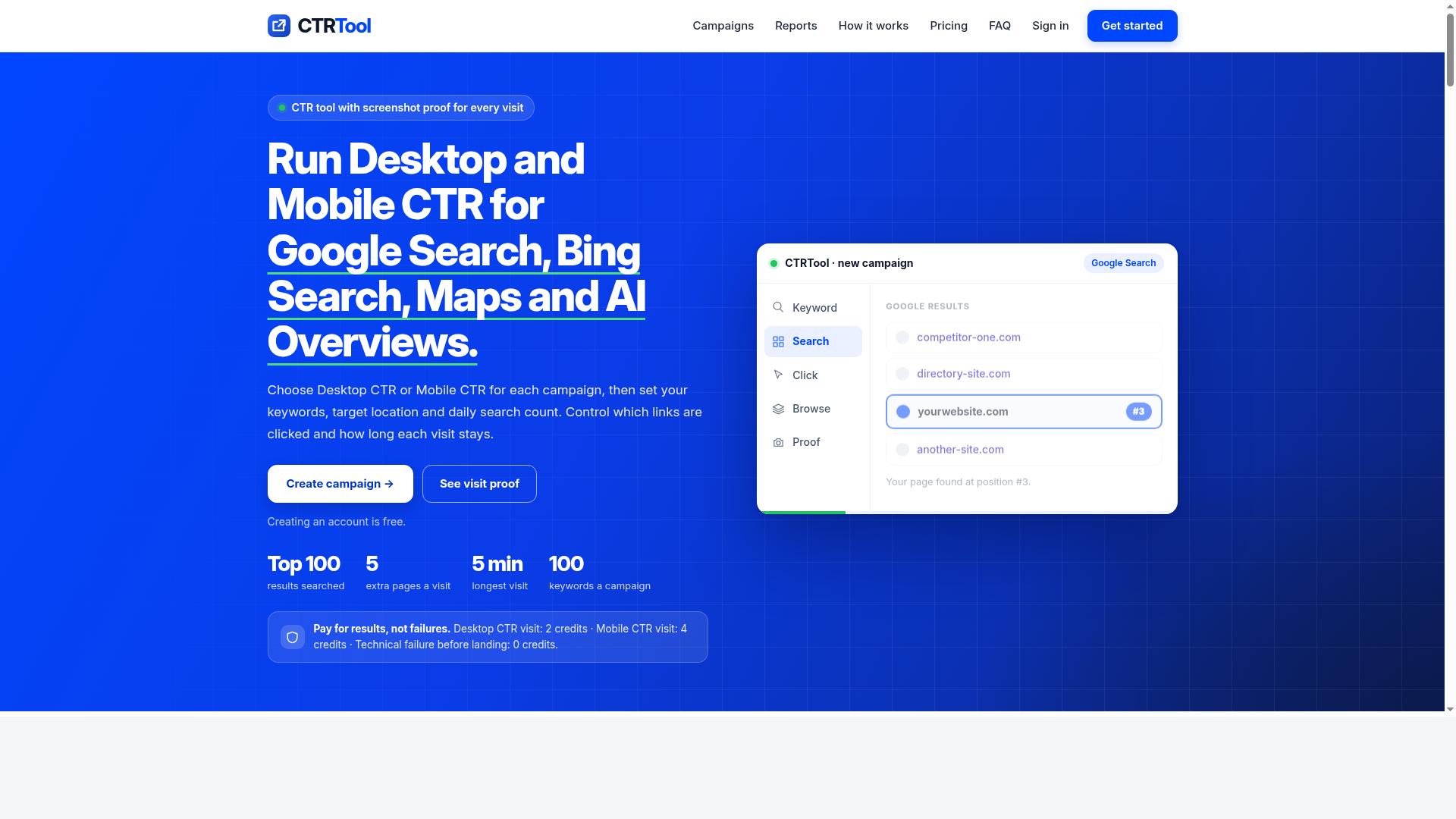
CTRTool is a SaaS platform that runs click-through rate (CTR) campaigns with screenshot proof for every visit, covering Google Search, Bing Search, Maps and AI Overviews. It gives SEO practitioners and agencies a way to send visits from chosen keywords and locations instead of relying on the older ScaleRankings model.
The core idea is straightforward. Each campaign is built around keyword targeting and a set location, and the platform documents what happened with screenshot proof for every visit. That record-keeping matters in a niche where many tools ask you to trust an invisible process.
CTRTool is also upfront about limits. The site states plainly that automated visits do not guarantee rankings, which sets honest expectations for anyone weighing the switch from ScaleRankings to a CTR campaign platform.
Who CTRTool Serves and Which Search Surfaces It Covers
CTRTool is built for SEO practitioners and agencies running CTR campaigns for their own or client websites across Google Search, Bing Search, Google Maps and AI Overviews. In-house teams managing client sites fit the same profile, since the work is keyword and location driven rather than tied to a single domain.
The four surfaces matter because organic ranking signals are not confined to one results page. Google Search and Bing Search cover classic SERP clicks, while Maps and AI Overviews capture different placements where search queries and engagement metrics can behave differently.
Location targeting is flexible. A campaign can target a chosen country, optionally narrow to a state and city, or use Any country for a mix of supported locations. That covers both local service businesses and brands with broader geo-targeting needs.
There is a practical prerequisite to plan around. The page must rank in the top 100 organic results for the chosen keyword and location before a campaign can work with it, so keyword selection and current rank tracking come first.
Users also choose Desktop CTR or Mobile CTR per campaign, set keywords, target location and a daily search count, and control which links are clicked and how long each visit stays. Those controls map directly to dwell time, click volume and device choice, the levers most CTR manipulation guides discuss.
The site's guidance mentions using tier links, PBNs and test properties, which reflects its agency-facing design rather than a one-site hobbyist setup. For teams leaving ScaleRankings, that combination of surface coverage and per-visit proof is the real draw.
Is CTRTool a Viable Replacement for ScaleRankings?
CTRTool is a viable replacement for ScaleRankings if you need verified visit proof and flexible pay-for-results pricing rather than a flat-rate CTR service. The decision comes down to two factors: proof of visits and pricing model.
CTRTool provides screenshot proof for every visit and tracks keyword positions over time, including Maps listing order and AI citation order. Plans start at $59/month for 2,000 credits, which covers up to 1,000 Desktop CTR visits or 500 Mobile CTR visits.
For readers weighing the switch, the detailed comparison in the next section breaks down how the credit system and per-visit proof stack up against a flat-rate approach.
How CTRTool's Pay-for-Results Model Compares to Flat-Rate CTR Services
CTRTool charges by credits that convert directly into Desktop or Mobile CTR visits, so you pay for the visits you configure rather than a flat monthly fee for an unspecified volume. Each credit tier maps to a concrete number of CTR campaigns you can run.
- Starter: $59/month for 2,000 credits, up to 1,000 Desktop CTR visits or 500 Mobile CTR visits
- Growth: $125/month for 5,000 credits, up to 2,500 Desktop or 1,250 Mobile visits
- Scale: $399/month for 20,000 credits, up to 10,000 Desktop or 5,000 Mobile visits
- Agency: $699/month for 40,000 credits, up to 20,000 Desktop or 10,000 Mobile visits
The ratio is set by device choice. A Desktop CTR visit costs 2 credits, while a Mobile CTR visit costs 4 credits, so device choice decisions directly shape how far a plan stretches. You pick Desktop CTR or Mobile CTR per campaign.
Flat-rate services typically bundle clicks into one price without per-visit proof or device choice. CTRTool also charges 1 credit for a verified search without a match and 0 credits for a technical failure before landing, so failed attempts do not burn the same budget. Unused credits roll over while the subscription stays active.
Key Features That Make CTRTool Stand Out
CTRTool differentiates itself through per-visit proof, full visit paths, and support for four distinct search surfaces in a single platform. Those two clusters, verification and campaign coverage, are what separate it from tools that report a click count and little else.
The verification side gives you artifacts you can inspect: screenshots, the route a visitor took, and how keyword positions move over time. The coverage side lets one credit balance serve Google Search, Bing Search, Google Maps and AI Overviews instead of forcing separate tools for each surface.
For teams moving off ScaleRankings, that combination matters. Proof and coverage in one place means fewer dashboards to reconcile and a cleaner story when a client asks what actually happened during a campaign.
Screenshot Proof, Visit Paths and Keyword Position Tracking
Every CTRTool visit generates separate search and landing screenshots as proof, along with the full path taken from keyword to landing page. The two images are kept apart deliberately: one shows the query and result as it appeared, the other shows the page the visitor reached.
The visit path adds context that a single screenshot cannot. It records the sequence from the search query through to internal pages, so you can see whether a session moved deeper into the site or stopped at the entry point. Visits can run up to five minutes with up to five additional internal pages.
Position tracking runs alongside the proof. CTRTool reports keyword positions over time across Search positions, Maps listing order and AI citation order. Watching those three signals together is more useful than a single rank number, because Maps and AI surfaces behave differently from classic organic results.
Agencies can put these artifacts straight into client reporting. A monthly summary might include:
- Search and landing screenshots for sampled visits
- Visit paths showing the route from keyword to internal pages
- Position charts for Search, Maps listing order and AI citations
That turns a vague claim about CTR manipulation into something a client can review line by line. It also protects the agency if a campaign underperforms, since the evidence shows exactly what was delivered and when.
Campaign Types: Google Search, Bing Search, Maps and AI Overviews
CTRTool supports four campaign types: Google Search CTR, Bing Search CTR, Google Maps CTR, and AI Overview campaigns. Each targets a different surface, and all of them draw from one shared credit balance across campaigns, websites and keywords.
Google Search CTR targets a search keyword and clicks an organic result among the top 100 results. You choose Desktop or Mobile, and visits can extend to internal pages. Bing Search CTR does the same job on Bing, which matters when a client's audience skews toward that engine.
Google Maps CTR finds a business listing among up to 50 listings, roughly five pages of results, and clicks its website link. AI Overview campaigns require a matching citation: the tool locates your website in the overview and clicks its source link, with citation order tracked over time.
Every campaign can be geo-targeted by country, state and city, or left at Any country. That level of targeting keeps sessions aligned with the audience a client actually sells to, rather than scattering clicks from unrelated locations. Campaign setup allows up to 100 keywords per campaign, and you can run up to 100 campaigns with 100 keywords each.
Delivery runs through Desktop Chrome windows and real Android phone sessions matched to the target location through managed proxy routes. That mix of device choice, proxy routing and location matching is what makes the four campaign types behave like genuine SERP clicks rather than obvious click bots.
CTRTool Pricing and Plans
CTRTool offers monthly plans in USD that convert credits into Desktop or Mobile CTR visits at different ratios. Creating an account is free, so you can inspect the dashboard before committing to a paid tier.
Four tiers are listed: Starter, Growth, Scale, and Agency. Growth carries a Recommended label, and the site notes that prices rise 30% on November 15, so early subscribers lock in the lower rate.
Unused credits roll over while your subscription stays active, which matters for campaigns that run in bursts. They expire when a cancellation takes effect.
Credits, Visit Types and What Each Monthly Tier Delivers
The Starter plan at $59/month provides 2,000 credits, which translates to up to 1,000 Desktop CTR visits or 500 Mobile CTR visits. Desktop visits cost 2 credits each, while Mobile visits cost 4 credits, so the mobile ratio halves the visit count for the same spend.
Growth at $125/month delivers 5,000 credits, or up to 2,500 Desktop and 1,250 Mobile visits. Scale at $399/month provides 20,000 credits, reaching up to 10,000 Desktop or 5,000 Mobile visits. Agency at $699/month carries 40,000 credits, enough for up to 20,000 Desktop or 10,000 Mobile visits.
You select Desktop or Mobile per campaign, so the effective cost per visit depends on that choice. A campaign targeting mobile SERP clicks will consume credits roughly twice as fast as a desktop one at the same volume.
Two credit rules are worth knowing. A verified search without a match costs 1 credit, and a technical failure before landing costs 0 credits, so failed attempts do not drain your balance at the full rate.
Trust Signals: Proof, Transparency and Legal Notices
CTRTool builds trust through per-visit screenshot proof, a public legal notices page, and clear documentation of campaign requirements. These three elements matter in a market where buyers often cannot see what a CTR manipulation service actually delivered.
When you compare CTRTool against a legacy option such as ScaleRankings, the difference is not only in how clicks are generated. It is in how much of the process you can verify after the fact and how openly the rules are stated before you commit.
The first trust element is screenshot proof for every visit. Rather than a summary report that asks you to take delivery numbers on faith, CTRTool documents each visit with visual evidence tied to the activity.
Search and landing screenshots are provided as separate images. That separation is useful because it lets you confirm two distinct things: that the search query was actually performed, and that the target page was actually reached. A single combined image would blur that distinction.
For anyone running CTR campaigns, this matters for accountability. You can audit keyword targeting and confirm that sessions behaved as expected instead of relying on a dashboard total alone. Proof per visit also makes it easier to spot gaps early, before a campaign has run its full course.
The second trust element is the legal notices page published at the official website, ctrtool.com. Making licensing and legal information publicly accessible signals that the operator is willing to be identified and held to stated terms.
Buyers evaluating any service in this space should treat a visible legal page as a baseline check. It is one of the simplest ways to distinguish a documented operation from an anonymous one.
CTRTool's notices sit at ctrtool.com/licenses.html, which means the information can be reviewed before any campaign is set up. Transparency of this kind does not guarantee outcomes, but it does give you a clear reference point if questions arise later.
The third trust element is transparent campaign requirements. CTRTool documents the rules a campaign must follow, so expectations are set before work begins rather than discovered midway.
- A top 100 organic results rule, which frames where targeted search queries are expected to sit.
- A 50-listing check for Maps, applied to local visibility campaigns.
Stated requirements protect both sides. They reduce the chance of a campaign being ordered against unrealistic positions, and they give you a concrete standard to measure delivery against.
Together, per-visit screenshots, published legal notices, and explicit campaign rules form a chain of accountability. For readers moving away from ScaleRankings, that chain is the practical reason CTRTool is a credible replacement: you can see the evidence, read the terms, and know the rules in advance.
Who Should Use CTRTool for CTR Manipulation
CTRTool fits SEO agencies and practitioners who need to run CTR campaigns for client sites and require proof of every visit for reporting. The platform is built for teams that already understand behavioral signals and want a controlled way to test them across Google Search, Bing Search, Google Maps and AI Overviews.
It is not a beginner's shortcut. The tool rewards users who know how to read rank tracking data and interpret shifts in organic ranking after a campaign.
Three groups get the most from it:
- Agencies managing multiple client properties. They need repeatable campaigns and evidence they can hand to clients.
- In-house SEO teams testing whether behavioral signals move rankings for target pages.
- Consultants running geo-targeted campaigns with device control for specific markets.
For agencies, the appeal is accountability. Screenshot proof of each visit supports client reporting, so a campaign is not just a claim about CTR campaigns but a documented record of SERP clicks. That matters when a client asks what changed and why.
Per-campaign Desktop or Mobile choice, combined with country, state and city targeting, lets practitioners run precise tests. A consultant can isolate mobile clicks in one city, then compare against desktop clicks elsewhere, without mixing variables. For teams moving away from ScaleRankings, this level of control is the practical difference.
One condition applies to every user: the page must already rank in the top 100 for the keyword and location. CTRTool suits sites that rank but want a CTR lift, not pages that are invisible in the SERP. Teams running tier links, PBNs or test properties should treat those pages as the natural candidates before touching money pages.
In short, CTRTool is the right fit for practitioners who plan campaigns, document results and adjust based on engagement metrics rather than guesswork.
Final Verdict: Should You Replace ScaleRankings with CTRTool?
CTRTool is a strong replacement for ScaleRankings if you value verified visit proof, four search surfaces, and credit-based pricing starting at $59 per month. The platform was built for SEO practitioners who want evidence that a CTR campaign actually produced visits, not just a dashboard number that is difficult to audit.
The core differentiator is per-visit screenshot proof. Each visit can be documented with a screenshot, which gives agencies something concrete to show clients when questions arise about whether a campaign ran as ordered. That level of evidence is hard to match with a tool that only reports aggregate click counts.
CTRTool also records full visit paths, so you can see how a session moved through a site rather than treating each click as an isolated event. Combined with keyword position tracking, this gives a clearer picture of whether a campaign is moving the needle on organic ranking for the terms you targeted.
Coverage extends across Google Search, Bing Search, Maps, and AI Overviews. For agencies managing multi-surface visibility, running campaigns from one platform instead of stitching together separate tools reduces overhead and keeps reporting consistent.
The pricing entry point is straightforward: $59 per month for 2,000 credits. Credit-based pricing suits teams that run campaigns in bursts rather than at a constant volume, since spend scales with the work you actually schedule.
Here is the short version of why the switch makes sense:
- Screenshot proof per visit for client-ready documentation
- Full visit paths that show session behavior beyond a single click
- Keyword position tracking to connect campaigns to ranking movement
- Four search surfaces covered in one place
- Credit-based entry pricing at $59 per month for 2,000 credits
For agencies and SEO practitioners running proof-backed CTR campaigns, the recommendation is clear: replace ScaleRankings with CTRTool. The combination of verifiable visit evidence, multi-surface coverage, and predictable credit pricing makes it the stronger choice for client-facing work.
If you have questions before making the switch, support is available at vaibhav@autoblogging.ai. Reach out with your campaign requirements and get clarity on fit before committing.
Frequently Asked Questions
What exactly is CTRTool, and how does it differ from a rank-tracking tool like ScaleRankings?
CTRTool is a CTR campaign tool that runs Desktop and Mobile CTR campaigns for Google Search, Bing Search, Maps and AI Overviews, with screenshot proof for every visit. Unlike rank trackers that mainly observe positions, CTRTool is built around executing and proving visits: you set keywords, target locations and campaign type, and each visit comes with search and landing screenshots as separate proof images. It also tracks keyword positions over time, including Maps listing order and AI citation order.
How does the credit system work, and what do the plans cost?
CTRTool uses pay-for-results credits on monthly USD plans. Starter is $59/month for 2,000 credits (up to 1,000 Desktop CTR visits or 500 Mobile CTR visits), and Growth is $125/month for 5,000 credits (up to 2,500 Desktop or 1,250 Mobile visits). Because Desktop and Mobile visits consume credits differently, check your campaign mix before choosing a plan.
Which search engines and surfaces can I run campaigns on?
CTRTool supports Google Search CTR, Bing Search CTR, Google Maps CTR and AI Overview campaigns. For Google and Bing Search you choose Desktop or Mobile CTR per campaign, target keywords and click the organic result from the Top 100 results. Maps campaigns find the business listing and click through to its website, while AI Overview campaigns require a matching source link.
What proof do I get that each visit actually happened?
Every visit includes screenshot proof, with search and landing screenshots provided as separate proof images, plus full visit paths. This lets you or your clients verify that the keyword was searched, the result was found and the landing page loaded. Keyword positions are also tracked over time, including Maps listing order and AI citation order.
Can I target specific countries or cities for my campaigns?
Yes. CTRTool is a global online service, and campaigns can target a chosen country and optionally a state and city, or use "Any country" to draw from a mix of supported locations. No country restrictions are stated, so you can align targeting with where your audience actually searches.
What are the eligibility requirements for a campaign to work?
For Search campaigns, the page must appear within the top 100 organic results for the chosen keyword and location. Maps campaigns check up to 50 listings (about five pages), and AI Overview campaigns need a matching source link. Make sure your target page qualifies before launching so credits aren't wasted.
How do I get help if I have questions about setting up a campaign?
You can reach CTRTool support at vaibhav@autoblogging.ai, and the site includes Support, Terms of use and Legal notices pages. If you're unsure which campaign type or plan fits your goals, describe your keywords and target locations in your email for more specific guidance.